


Why TrayJuice?
Before you're stranded
See your charge level before a long session, meeting, or match — not when the lights start flashing.
One glance away
No extra apps to open, no digging through Bluetooth settings. Your battery lives where you already look.
Lightweight by design
TrayJuice starts once and fades into the background. Open the window only when you want more detail.
What you get
- Live taskbar icon
- A battery icon in your system tray that updates on a schedule you pick — from every few seconds up to every five minutes.
- Low-battery alerts
- Optional Windows notifications when your charge drops — plus connect and disconnect alerts if you want them.
- Automatic setup
- Pair your keyboard in Windows, launch TrayJuice, and it handles the rest — no long configuration flow for supported devices.
- Detail when you want it
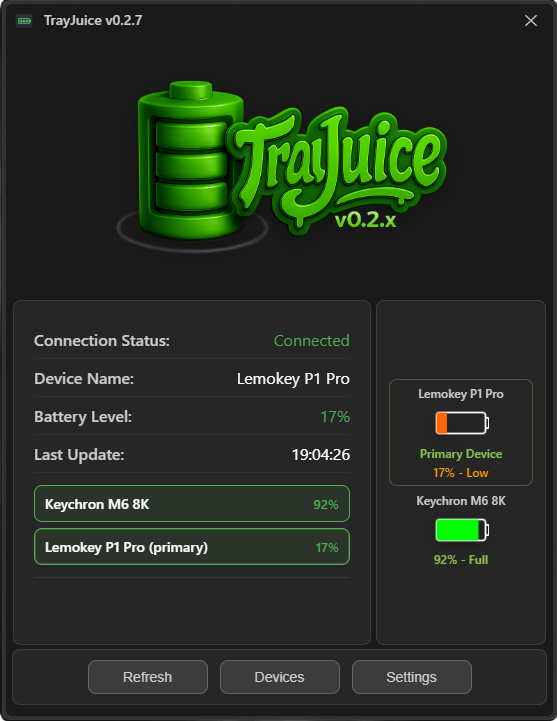
- A compact window with connection status, device name, battery percentage, and last update — hidden until you open it.
- Your preferences
- Choose refresh interval, auto-start with Windows, notification behaviour, and whether the app minimizes back to the tray.
- When something's off
- Built-in troubleshooting for those moments when pairing or readings don't behave — without leaving the app.
- Multiple devices
- Monitor up to 3 devices at once; the lowest battery (or your chosen primary) shows in the taskbar.
- Primary device picker
- Choose which device is displayed as primary in the taskbar, or keep the default lowest-battery device.
- Keychron mouse support
- TrayJuice can monitor Keychron mice and show battery level in the taskbar.
Compatibility
Confirmed working
- Lemokey P1 Pro — tested and verified
- Keychron M6 — tested (may appear as “Keychron M6 8K”)
- Razer Naga V2 HS — tested (Windows often shows “Naga”)
- Bluetooth / BLE — not 2.4 GHz dongle or USB
- Windows 10 or 11
On the roadmap
- More Keychron & Lemokey models — hardware testing in progress
- Other Razer models — broader testing in progress
- macOS and Linux — planned (battery backend still Windows-only)
Want TrayJuice on your desktop?
TrayJuice is always free — optional donations go toward testing other keyboards, wider Lemokey and Keychron support, and planned macOS and Linux versions.